Hopefully see a few people there on Tuesday Nov 13 at 8am.
The class is completely full :), but in previous years they have let people queue and then take the place of those who don't show up.
Again, it's an honour to be co-presenting with Jim Quanci from Autodesk who has led out the Autodesk Developers Network for years and more recently the Autodesk Forge programme.
If anyone attending AU would like to catch up over a cup of coffee - please send me a tweet at @StephenHamilNBS.
This blog post includes a few extracts from my BiLT NA presentation at St Louis, USA. Rather than a printed 'hand-out' this is a brief summary with hyperlinks to useful links and some of the video sequences from the live examples...
1. The need for standardization
Standardization allows for efficiencies and reduced risk. The illustration below shows a number of examples of where geometry has been standardized (bricks, blocks, opening sizes or ceiling tiles, air conditioning units, lighting) and where technology has been standardized (HTML, CSS, Scripting in websites. The earliest examples of standardization are believed to be from the Indus Valley civilization when weights were used for trading.
Improve efficiencies and lower risks through standardization
The history of NBS has been around standardization, more specifically around standardization of specification structures in the UK. NBS was formed in 1973 around an industry need for this and has played a leading role in the Uniclass initiative over the decades.
When the UK Government BIM mandate was announced, process, information exchange and classification was standardized for BIM projects. However, at NBS we believed that there was a gap in the market with respect to standardizing BIM objects. We had been part of the team developing the BS 8541 series, but believed that the industry needed more.
2. Common areas of frustrations
Following a number of customer focus group sessions and practice visits we discovered that there were a number of frustrations around the quality of BIM objects being distributed and used in the industry. An illustration of three of these frustrations are highlighted in the examples below..
Example problem 1 - Badly built objects
Modelling tools such as ArchiCAD and Revit had allowed functionality to be linked to parameters. But many objects broke when these parameters were modified. In the example below, when the generic tank object is modified, the geometry completely breaks.
Example problem 2 - Objects with inconsistent information
BIM is about information in addition to the geometry. However, if care is not spent keeping the information consistent, then it cannot really be utilised for scheduling, material take off, analysis etc... In the example below, two doorsets are shown from the same content source. Immediately inconsistencies are apparent.
Example problem 3 - Objects that are 'over-modelled'
Modelling tools allow the object author to model as much geometry as they wish. Equally, many tools allow for fabrication models to be imported into workflows designed for architecture. The result is objects that have a file size that is far bigger than needed for the purpose. In the example below, every screw-thread and bolt is modelled on an air conditioning system.
3. NBS BIM Object Standard
In order to support the industry, at NBS we developed an easy-to-understand BIM Object Standard. This can be accessed for free at:
- nationalbimlibrary.com/nbs-bim-object-standard
This standard was developed in consultation with industry, working with experts in the UK, Australia and Canada. The standard pulls in the best practice from sources such as IFC, COBie, international classification systems and the BS-8541 series. Although the examples provided in this blog post are illustrated using Revit, the standard has been written to be platform independent.
This standard is split into five main sections and examples are provided below from each of these sections:
NBS BIM Object Standard - 1. General requirements
This section covers the use of language, generic or manufacturer identification and IFC class type.
NBS BIM Object Standard - 2. Infomation requirements
This section covers the type/instance properties, naming, IFC and COBie property sets, standard properties and properties to cover certification and environmental credentials.
NBS BIM Object Standard - 3. Geometry requirements
This section looks at the Goldilocks principle of 'just right' - not too much geometry, but enough geometry that it is fit for purpose. An example of too much geometry would be the nuts and bolts on the air conditioning unit. An example of not enough geometry would be wanting to show doors and windows at a particular scale and not showing the correct visuals per the international standard.
NBS BIM Object Standard - 4. Functional requirements
Considerations such as what surface an object should be hosted to, indication of operation and maintenace zones and functionality that doesn't break the object. The example below shows a generic MEP object that assists an engineer when designing around spatial constraints.
NBS BIM Object Standard - 5. Metadata requirements
Considerations around file naming and abbreviations. The example below shows that objects can easily be located when displayed in a list if they are named consistently.
4. Useful resources
This is the object standard that all NBS National BIM Library objects are authored to. This now represents objects from over 300 leading manufacturers and it is increasingly becoming the content creation guide used by practices around the world.
In addition the standard itself, the following links are useful for anyone creating objects.
buildingSMART - http://www.buildingsmart-tech.org IFC 2x3 and 2x4 schemas are particularly useful for the class types and standardising key performance properties.
BIMForum LOD - bimforum.org/lod/ Illustrative examples, mainly around geometry, for typical elements found in the built environment.
National BIM Library - nationalbimlibrary.com 1000s of generic and manufacturer objects that may be downloaded for either immediate use on a project, or for a basis of customisation to create an object for a particular purpose.
It looks at BIM as technology enabling collaborative project teams to work with consistent, standardised data. It asks why construction is less productive than other industries and proposes a 27 point action plan grouped in nine categories.
It concludes that the supply chain should collaborate and work more closely together. Clients, in particular governments around the world, should mandate BIM on their projects, running pilot projects and investing in training and incentives. Finally, it re-iterates the benefits such as improved quality, reduced costs, decisions that reduce environmental impact and greater certainty around outcomes.
It's always a nice suprise to see NBS initiatives mentioned in global publications - so it was great to see NBS National BIM Library being given as an example of creating a digital marketplace for construction.
One things Autodesk University do extremely well is post videos of the classes online for the wider global community to benefit from.
It's really nice to see the two classes I was involved with at AU London are now online.
If you are interested in them, please click below to watch...
Introducing Autodesk Forge and its role in BIM workflows: A success story with NBS
Learn about what the Autodesk Forge platform is capable of and how you can benefit from it. In this session Brian Roepke will introduce some of the features within Forge and explain how this powerful, cloud-based software platform can be the build block for your next tool or product. Dr Stephen Hamil will then demonstrate how NBS have utilized the power of Forge to allow coordinated models and specifications to be viewed through the web browser. Live demonstrations of practical customer examples will also be shown from UK architecture and engineering BIM projects.
- http://au.autodesk.com/au-online/classes-on-demand/class-catalog/classes/year-2017/forge/lo-aec36#chapter=0
Class 1 - Presenting cloud opportunities with Autodesk and BDP
Practical examples of how to develop and coordinate information on a BIM project
This class will present how project teams can collaborate to develop information on a BIM project. We will initially look at setting up a plan of work to give clarity on which team members are delivering what information and when. Following this we will look at how designers can develop their designs using standardised BIM objects in Revit. Practical examples will then be given on how to link these objects digitally to the associated specification to better coordinate this information and reduce risk. We will finish by exploring the role of the cloud and big data in future workflows and show practical examples of how the Forge platform can accelerate this. Stephen was part of the team that developed the UK government’s BIM Level 2 standards and tools. As director of research and innovation at NBS, he has been fundamental in developing the products that led to NBS being the first UK Autodesk Solution Associate in 2016.
- http://au.autodesk.com/au-online/classes-on-demand/class-catalog/classes/year-2017/revit/lo-aec29#chapter=0
As part of the launch of our new brand and our new website - we now have a dedicated place on our website explaining how NBS products and services can support you within your BIM workflow.
As part of this, we have just produced a three minute video as a short introduction.
What I think is particularly nice about this video is that the story is told from our own building project that is currently under way. This is a genuine model of our building. The content and software examples are genuine. Some stills from the video are explained below.
At an early stage, client information requirements can be defined in the NBS BIM Toolkit
Assa Abloy presenting how they have worked with NBS to deliver against their BIM strategy
It's great to see screen grabs of our content and tools being used on BIM projects. If anyone out there wants to send any in for inclusion in a blog post please get in touch.
First of all a very merry Christmas to anyone who has visited my blog this year. I hope everyone has a great Christmas break and returns ready to go again in 2016.
Merry Christmas and a Happy New Year to all who visit this blog!
I've now been blogging about BIM, technology and all things NBS for over six year - time flies! At the end of each year I look at the web stats to see which of my posts attracted the most web traffic. Now looking back at 2015, in reverse order the top five were...
In February a social media/blogging debate started asking the question whether standards were needed in terms of BIM object creation.
After observing opinion, I put my two pennies worth in arguing that by standardising terminology and promoting international, and national standards, then a greater quality of BIM object is created. We have consistent data on sites like rightmove and autotrader and this allows us to make more informed decisions - so why not for BIM?
In March we were fortunate enough to be chosen by UBM to curate the content for their BIM Theatre at Ecobuild. I think we put on a decent show with well over 100 delegates at each presentation.
The blog post looked back at the three days in East London at one of the construction industry's biggest annual events.
Note - watch this space for news about Ecobuild 2016!
The second most popular post of the year looked at the 2016 enhancements to our plug-in. Link to the specification, view NBS design guidance, check annotations, drag and drop objects into the model, synchronised guidance about the objects... As a free tool it really helps put the information into building information modelling.
NBS led the team that worked through a six-month funding period (and beyond) to develop this. The Toolkit in ten minutes blog post gave an overview to all of the key concepts and gave pointers on where to find out more on all of these in terms of technical articles.
Those that have signed into the library will notice that they have a personalised homepage. There are three main areas:
The objects you have 'starred' - these are potentially the objects you use most often or the objects you have flagged to download at a later date;
The objects you have previously downloaded that have since been updated; and
A list of all the objects you have ever downloaded.
A personalised homepage
The starred objects are presented in a data grid so the objects can be easily downloaded, sorted or filtered. The screenshot below shows that the objects have been sorted so that they are grouped by the same category.
The screenshot below shows the Downloaded tab. In this screenshot the user has filtered the list of objects to show those relevant to the search term 'sanit...'.
Your download history
The starred and downloaded objects are a filter option for when you search. In the screenshots below the user quickly filters 681 objects relevant to insulation down to just the 5 relevant items that have been starred.
New search filters
Quickly find the objects you need
The NBS National BIM Library is not just a website for a desktop computer. The user experience is also optimised for mobile or tablet. It's now easy to 'star' an item when you are on your mobile (maybe on a train or at home on an evening).
Fully responsive
Items that you have starred are accessible from whichever device you are using. For example, you could star an item on your mobile and then access this from the webbrowser on your desktop the next day. Another workflow example could be if you are using the NBS Plug-in for Autodesk Revit. The screenshots below show the National BIM Library website being accessed from inside the design tool. Your favourite objects can be found quickly and then added to your model through simply dragging and dropping.
We held an event yesterday for prospect businesses with a view to showcasing our business and our expertise in BIM. This blog post highlights some of the key messages and also some of the insight we received through asking the delegates their opinions. The speakers were largely from NBS giving different insights from their areas of expertise.
Rather than a big waffley blog post – I just include some of the slides and a little bit of commentary.
1. Richard Waterhouse – CEO
Richard gave a strategic overview as to what BIM is, what it means for the industry and how NBS can support construction manufacturers on their journey.
Every seat filled on the top floor of Millbank Tower
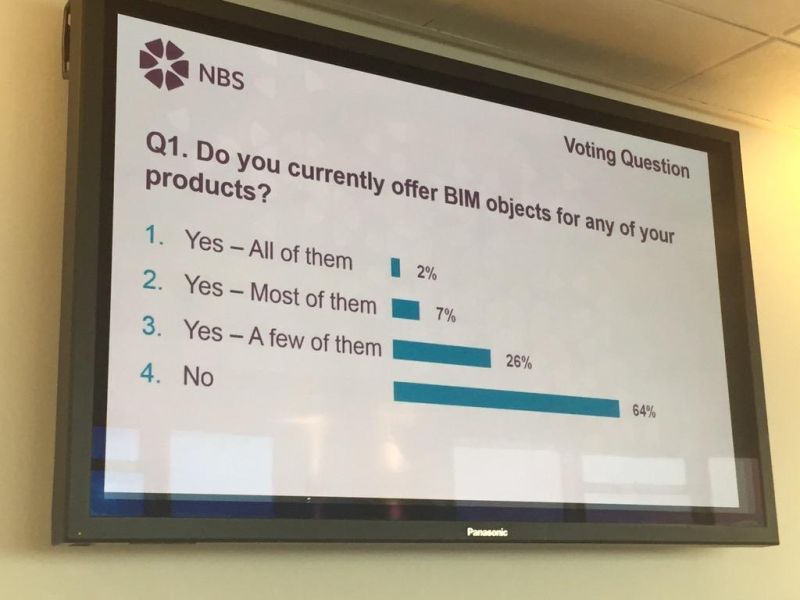
Still a long way to go in terms of manufacturers and BIM object creation
The NBS BIM ecosystem – coordinating well-structured information
2. Adrian Malleson – Head of forecasting and research
Regular visitors to the blog will know Adrian from the excellent work he has done over the years with the National BIM Report. Adrian’s team at NBS do far more than just this BIM report though and today he gave an insight into the external factors that influence our industry. The financial situation, sustainability and urbanisation challenges and disruptive technology where all looked at.
The industry is currently in a good place
Quite a lot of new buildings will be needed across the world
More evidence that the manufacturer community is largely not ready for the demands of BIM
To learn more about the Market Research opportunities at NBS - please visit:
3. Tom Murphy – David Miller Architects
To give the view of a construction professional independent of NBS, Tom Murphy from David Miller Architects kindly came and demonstrated how a small practice’s BIM process works.
BIM training and software is inexpensive when compared with costs and the fees that can come in
The NBS National BIM Library can be used as a model evolves from using generic to proprietary objects
The NBS National BIM Library can be relied upon for quality information rich objects
Certification against the NBS BIM Object Standard gives an assurance of quality
Using the NBS BIM plug-in allows the model and the NBS Create specification to be coordinated
4. Live demonstrations – Ian Chapman, Drew Wiggett and Chris Vickers
The delegates were then split into two groups. Ian Chapman took a group wanting a beginners introduction into BIM. Drew Wiggett and Chris Vickers presented some more advanced topics to those already on their BIM journey.
A beautiful venue with the Millennium Wheel in the background
Cheesegrater, Gherkin, Shard and Ian Chapman
How to create objects to the NBS BIM Object Standard
5. Me
Moving on, I then presented the BIM Toolkit and in particular how manufacturers can best provide their technical data to the project team working on level-2 BIM projects.
LOD guidance for building fabric and building services items
LOI guidance for building fabric and building services items
A nostalgic look at the inefficient ways that information used to be developed and transported
The argument is over now – the traditional methods are dead and digital is here to stay
Digital information in different formats from manufacturers is needed throughout the project timeline
The BIM Toolkit presents the correct information at the right time to the correct person - NBS manufacturer customers are positioned in an optimum position on the page
6. Robin Cordy – Director of Digital
A BIM object is one way that a manufacturer can deliver greater value to their engineering or architectural ‘customer’. But how do they know that creating BIM objects provides a return on investment?
Robin Cordy, Director of Digital at NBS is a specialist in digital commerce, below are a few slides from him.
Know what metrics that will show things are working
Five steps to success
Maximise the exposure of your content in the products and services that the decision makers use
One final speaker was Fiona Cruickshank who is a Entrepreneur and Angel Investor. I always like to hear from those who have had success in other industries and how clear parallels can be seen.
Fiona talked about the pharmaceutical manufacturing industry and in particular how new legislation and disruptive change can be the best business opportunity. If you are fast to react, prepared to take calculated risks and invest a little then the rewards can be enormous.
Fiona had built up a number of businesses and had invested in many others and was an inspirational speaker to have at the event.