Showing posts with label buildingSMART. Show all posts

Monday, 20 May 2019

Intelligent specification, in the cloud

Over recent years, using the cloud has allowed me to connect applications and data together inside and outside work.

Looking at examples from outside work, it's so easy to embed a youtube video within Facebook - or transfer the data from a fun run from Garmin to Strava - or buy a book on the Amazon App and then see it on my Kindle. The cloud has revolutionized the way we interact in our daily lives.

When working on NBS Chorus, as a cloud based tool we expected that this would transform the way the industry interacted with specifications. We were aware of some immediate transformational benefits such as (1) functioning on other devices other than PCs (Mac, Tablet, Chromebook etc...), (2) the ease at which contributors can be added to a project and (3) the end to problematic installation of software and content on local machines/networks.

However, now that Chorus has been released - it's great to see some additional cloud benefits.

A special shout out here to Rob Jackson from Bond Bryan Digital (plug below - check out their services) for tweeting a few of the workflows he has managed to get Chorus linking to open data methodologies.
Credit to Bond Bryan for screengrabs below - check them out at https://bondbryan.co.uk/digital
One click access from collaboration tool BIM Track

Linked specifications from Graphisoft ArchiCAD

Specification connections coming through into the IFC export and viewed in Solibri

Going the full pro 'Information Manager' and ticking all of the boxes with NBS one-click links in Airtable data dashboard on Mac and smart phone!
It's great to see NBS now so accessible - the days of NBS on the PC only are a thing of the past.

- Follow Rob from Bond Bryan Digital on Twitter

Friday, 13 May 2016

Introduction to the principles of BIM

A nice little cartoon video explaining the open BIM principles through the project timeline from buildingSMART international. Worth a watch...


It's interesting contrasting this vision with how far we have come on the UK BIM journey. We're definitely on the same page, just not quite as far along as these buildingSMART open BIM principles (yet).

BIM Level-2 in the UK...

  • Data format = COBie not yet IFC
  • Process = Digital plan of work not yet IDM
  • Terminology = Data templates not yet IFD/bSDD

Maybe an in-depth look at BIM Level-2 vs buildingSMART vision is a good blog post for the future?

Thanks to my colleague Ian Chapman for the video spot.

Wednesday, 29 April 2015

BIM Toolkit and Verification

One of the aspects of the BIM Toolkit we still have in private beta is the verification functionality. Without doubt, this has been the biggest challenge, but we are pleased to be moving this into a place where it is ready for testing and industry engagement.

Tomorrow I will be presenting this workflow using a basic test model at the IStructE BIM conference. A few screenshots from this are below. The main verification support article will be published in the next few days at the web page below:
- https://toolkit.thenbs.com/articles/verification

With all of this development stream - the lion's share of credit, thanks for hard work and technical excellent lies with BIM Academy and the work they have done with their xBIM Software Development Kit.

The verification workflow starts with the definition of information requirements, then the development of information in response to these requirements, then the submission of this information, followed by validation and then ultimately (hopefully) acceptance.

The verification workflow
To demonstrate this workflow a very, very simple model is used below. If you'd like to support us in defining this process for different software vendor tools then please join our beta testing programme.

Please note that this project below will not win any architecture awards - it simply demonstrates the functionality.

1. Definition
The BIM Toolkit allows information requirements to be defined.
A project is created "The BTK Test Project"
Requirements for two types of space are defined.
Requirements are added for an asset that needs maintained
In the screenshots above, it can be seen that there is a requirement for certain types of space (bedrooms and dining rooms). There is also a requirement for handover information for all fan convectors.


2. Development
How does the user then create a submission file that is compliant with BS 1192-4:2014 (aka COBie)?

The answer is that they have three choices:

(a) Write it themselves in MS Excel
(b) Export using a plug-in for their BIM design tool
(c) Export IFC from their their BIM design tool and then create COBie from this

Assessing these three options, as part of this project, our strategy was to base everything around buildingSMART IFC and the read-write access to IFC that the xBIM SDK provides.

Generating IFC from a BIM design tool that has spaces and assets classified using the correct IFC field is a challenge and is a different process depending on what BIM design software you use. Providing support for every BIM platform out there is beyond the scope of this project - but we do want to work with users of different platforms and help put the knowledge out in the public domain.

The basic process is below...
Produce a model, classify it correctly, download enhanced IFC exporters, configure them and then click "export to IFC"
(documentation to follow to be shared with beta testers)
How good is your IFC?
Generate COBie from the IFC
Each instance of each space has the correct classification
Each component is of the correct type, with the correct classification against this type

3. Submission
The COBie may look like good COBie, but if in Microsoft Excel format, it's not an intergal relational database. So it is possible to check the COBie for relational errors.
Is it perfect COBie?
Those that have followed the IFC route to generating COBie can check the IFC visually in the viewer.
Spaces delivered checked against spaces types required
Assets delivered checked against assets required
4. Validation and acceptance
The final step is to automatically check the data and generate an acceptance report.

We didn't quite have this working on our servers at the time of writing the blog post. So the screenshot below is from the BIM Academy presentation. But hopefully it demonstrates the journey.
A simple report comparing requested information with what has been delivered
For those of you interested in IFC and BIM technologies, hopefully this is of real interest. We do now need your help in developing test models from simple through to more complex using various design tools. Those that think they can spare a little time here - please see details on our beta testing programme

It's fundamentally all about getting the data into a common documented standard format (IFC/COBie) so it can be checked. It is pushing the boundaries a little as traditionally IFC is used for clash detection and geometric visual checking. But this was a project about innovation and open standards - so writing some software routines that compared two MS Excel files was not an option.

More information:

Thursday, 26 March 2015

NBS BIM Toolkit at buildingSMART London

Today I will be presenting the NBS BIM Toolkit to the buildingSMART international conference in London.

We're approaching the end of the six month contract period and preparing for the soft launch on April 8th at BIM Show Live. So the Toolkit is now starting to look really good in terms of functionality and scope of content.

Looking back over the last few months, it's been a bit of a whirlwind, but it has been a really fantastic team effort and the launch is now in sight.

Looking back through some blog posts:
Thoughts after the workshops | Winning the contract | Update after two months | Update after four months | Update after five months

With two weeks left, some screenshots from today's presentation are below...
Adding tasks and deliverables to answer client plain language questions in an EIR
Adding deliverables, assigning responsibilities with notes and LOD banding
LOI bandings in addition to LOD
Not just buildings - but content for aviation, highways, power, rail, tunnels, waste and water...
A new unified classification system with mappings to RICS NRM1 and more mappings planned
IFC export of project, stage, task and deliverable property sets - as seen as visual cubes of data in BIM software
Online and offline verification of demand-vs-delivered using buildingSMART technologies
Hopefully this is all stuff that is of interest. To see the most recent presentation from a month or so ago please visit:

Remember to book your tickets for BIM Show Live if you want to be at the launch and question the NBS team.

Wednesday, 3 July 2013

Singapore 48 Hour BIM Challenge - update 4

The software development Big Push
The fourth and final update from me from the Singapore 48 hour BIM challenge.

The time is after midnight and into the last couple of hours and the NBS work is coming to a close.

The NBS contribution centred on the authoring of specification content and live software development.

However, before looking at this in a little more detail, the video below is probably my favourite thing of the 48 hours. What started off as one software developer from NBS at the start of 48 hours turned into seven mid-way through the second day (pictured to the right). The video below shows the xBIM IFC viewer embedded in NBS Create. The IFC model and the NBS Create specification are working side-by-side linking geometry and specification in one application.


...and a fuller report below...

1. Creating content
The NBS Create specification system was used to author a number of the BIM objects. The example shown in Figure 1 shows the specification of the Green Roof. Bespoke software was then written to convert this to an IFC type before being imported in the design model. Figure 2 shows this Green Roof with system properties and material build-up ready to be added to the main roof structure. All generated BIM content was to National BIM Library authoring standards (classification, naming convention, defined property-sets).
(click on images below for larger images)
Figure 1 – Authoring BIM objects using NBS Create
Figure 2 – The generated BIM object in the design model via IFC
As a low environmental impact was required, the project specification took this into consideration including:
Plants specified that are drought, salt and shade tolerant are locally native species;

  • The lowest NOx emissions chosen for the boilers; and
  • The procurement of wood managed in accordance with international agreements such as the Convention on International, Trade in Endangered Species of wild fauna and flora (CITES) and Sustainable Forestry Initiative (SFI), with Chain of Custody/ Programme for the Endorsement of Forest Certification (PEFC).

2. Specification into the model
The NBS Create system already links to the design model at a database and an object level. Additional software development took place over the 48 hours to take this link further down to a property level. Figure 3 shows the specification of doorset performance in NBS Create. Figure 4 then shows the import of these properties into the design model. Differences are highlighted to the user and these modified properties can then be imported and displayed in schedules.
Figure 3 – Specifying performance in NBS Create
Figure 4 – Importing the specification into the design model for scheduling
3. Model into the specification
One final big software development initiative was to embed the IFC exported from the design model into the specification software. This allowed the design to be used as a navigator for the specification. Figure 5 shows that the NBS Create specification system has the IFC model embedded to the left of the application. By double clicking on the objects – the corresponding specification opens in the editor.
Figure 5 – Embedded IFC model driving the specification system
All IFC work used the xBIM software component developed by Professor Steve Lockley from BIM Academy.

...and finally, magnificent work by @Clare_Watson and Ellie for all the blogging and videos and pictures and tweets over on the team's official blog -
- http://www.thenbs.com/blogs/bim/

Tuesday, 2 July 2013

Singapore 48 Hour BIM Challenge - update 3

In my last post I showed screenshots of the software development progress. A couple of videos (taken on an iPhone) demonstrating this below.

1. Creating IFC type objects from NBS Create...


2. Sucking properties out of NBS Create into the design model...
(jump to 2'29 to see the magic)

Monday, 1 July 2013

Singapore 48 Hour BIM Challenge - update 2

As part of the Singapore 48 hour BIM challenge we're giving a big focus to software development. After around 17 hours of non-stop coding progress has been pretty good in terms of writing the code and testing it with prototype models.

A few screenshots below demonstrating progress:

1. Generation of IFC directly from NBS Create
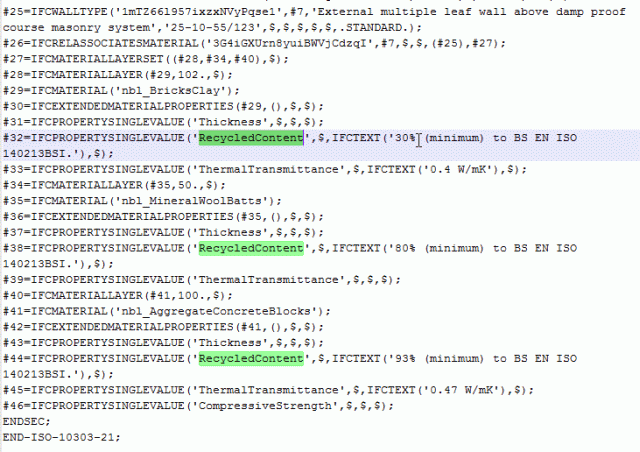
The first big development has been around the generation of IFC directly from the objects and property sets in NBS Create.

This is shown in the screenshots below. An external wall is specified using NBS, this includes the key products (blocks, insulation and bricks) and the key property values (recycled content, thickness, U-values. And then this is translated into an IFC type object. Within the design-tool the designer may then substitute a generic wall for the specific wall. We do have technology similar that helps create National BIM Library objects - but doing this from NBS Create would be really nice.
Specify in NBS Create
Generate IFC type objects
2. Import of property sets from NBS Create
The second development allows linked objects in the design model to have their property sets updated live from their corresponding object in the NBS Create specification. The screenshots below show this in action...
I can see the geometry - but where is the information?
The information can be populated in NBS Create with the help of expert technical guidance
Select which objects you want to update
Hey presto - the "i" in BIM appears
I'll probably do a video demo of both of these developments in action tomorrow once we have tidied things up a bit. We'll also be using both parts of the technology in the actual BIM for the competition tomorrow as it develops from a concept model with spaces into a model with a little more detail in.

Oh, and good to get a nice round number of followers on Twitter :)

Thursday, 25 April 2013

BIM, specifications and IFC

When we set out to update our NBS plug-in for Revit we were looking at some big functionality improvements. (1) Drag and drop of BIM objects from the National BIM Library, (2) Synchronised NBS design guidance with the model and (3) Automatic creation of a specification from the model.

However, quite often it’s the little “experimental” items of work that are strangely the most exciting. Our Software Development team have been working closely with Professor Steve Lockley from BIM Academy who has been doing some amazing work writing a set of components that read and write to/from IFC. The results have been so good that we’re going to release them as “beta functionality” in the toolbar.
The big IFC button
Consider the walkthrough below…

Within a design there will be different types of objects. Figure 1 below is a screenshot of a simple plan showing two types of door – a small internal door (D10 and D11) and a larger external door (D13). The door types have been associated with the NBS Create specification and these associations are indicated in the tagging.
Figure 1 - Instances of types of doors
Jumping across to NBS Create now, the specifier is selecting to specify the door in terms of its overall system performance. Figure 2 shows that clauses covering fire, acoustic and security performance are being added to the job.
Figure 2 - Specifying by system performance in NBS Create
The specifier can then start to complete the specification. However, the tricky part here is knowing what to specify in the specification model and what information to add to the geometric BIM (see previous post following LRUG discussions). Dimensions should be in the geometric model. Workmanship and information on accuracy, samples, tolerances etc… should be in the specification model. But what about key performance information?

Figure 3 shows that the specifier has chosen to complete this in the specification. The advantages of this are that the technical guidance, links to standards and regulations, practice guidance and suggested values are all at hand here.
Figure 3 - The process of specification
So how does our IFC export help here?

We have a little configuration file that allows the user to link the key property sets together between the geometric model (in this case Revit) and the specification model (NBS Create). So not only are the databases connected, not only are the type objects connected… but now the key performance properties are also connected. Figure 4 below shows the structure of this configuration file. Maybe in the future we’ll write a nice little user interface into this. But as far as XML files go – it’s pretty straight forward.
Figure 4 - The configuration file
So the user can now generate an IFC file that contains information from both the geometric and specification model. Figure 5 below shows that in an IFC viewing tool (and many free tools are available), the key performance properties of the door can be easily viewed within the IFC Pset_DoorCommon property set.
Figure 5 - Viewing the combined information set in an IFC Viewer
Where the IFC viewing software has information take off capabilities – then scheduling information is easy. Figure 6 below shows the information from all of the doors in the design In Solibri Model Checker v8.
Figure 6 - A rich, integrated door schedule - done
So, exciting stuff.

All of this hopefully demonstrates the power of well-structured objects, clever software and trusted, quality technical guidance. This is the journey we are on with NBS National BIM Library and NBS Create – we hope you like the direction we are going…

…and one final big shout out to Professor Steve Lockley, Research Director at BIM Academy – great behind the scenes IFC work has made our software developers lives easier.
Prof BIM - Still never beaten me at golf :)

BIM International

NBS, through its membership of buildingSMART, is working with other members from USA, Norway, Canada, France, Sweden, Japan, Australia and Germany to try and establish an international “Data Dictionary” so that the meaning of BIM data can be shared between software applications.
Chapman

NBS Head of Specification Ian Chapman (IanChapmanNBS) is on the Council of Management for buildingSMART UK and he and Birgitta Foster from the US buildingSMART alliance are two of those leading the project.

Ian commented, “Clear rules, guidance and content moderation are essential. Software vendors will need to adopt bSDD-assigned GUIDs to ensure that the items are aligned, whatever the language or term used”.

Birgitta commented, “The time is right to overcome the challenges and make the bSDD a resource for all countries to benefit from in the future”.
Call it what you want - but respect the GUID

"Face colour" - how does this translate internationally in a construction context?
For further information see:
This work is being done by NBS with one eye on the work that we have recently been doing for the UK Government BIM Task Group labs area that is starting to define the BIM level-3 vision.