Showing posts with label NBS Chorus. Show all posts

Thursday, 16 December 2021

NBS Chorus and user created content

How best to add user defined clauses within NBS is a question I quite often get asked when speaking with specifiers. I thought it may be worth doing a short blog post that looks at this for both section-based and system-based content structures.

1. Section-based content

'Section-based content' is pretty much any content that is not Uniclass 2015 technical specification content. So this includes UK CAWS, Aus content such as Speedpack and Specpack and also the Canadian CMS and NMS content.

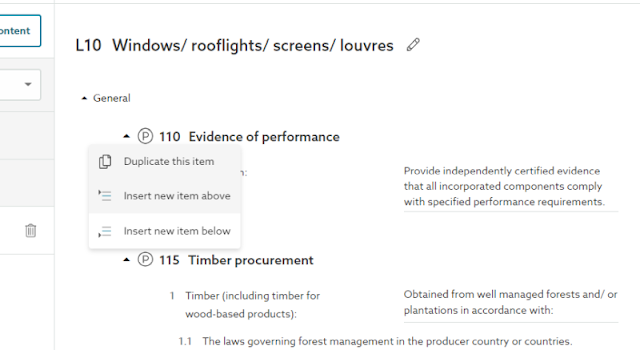
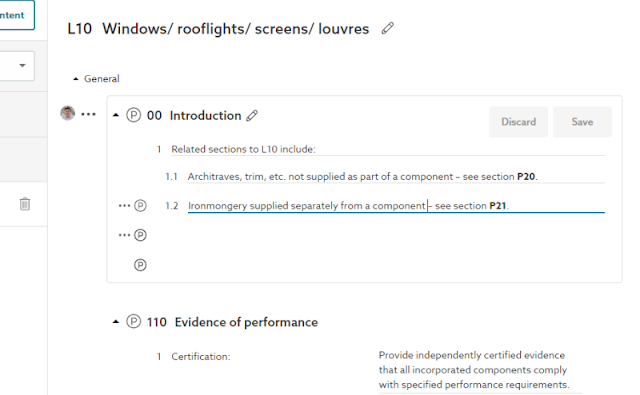
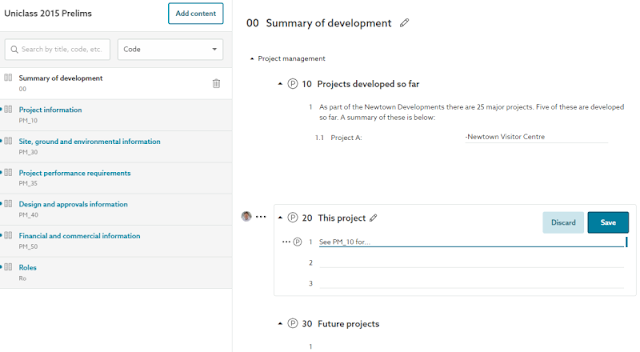
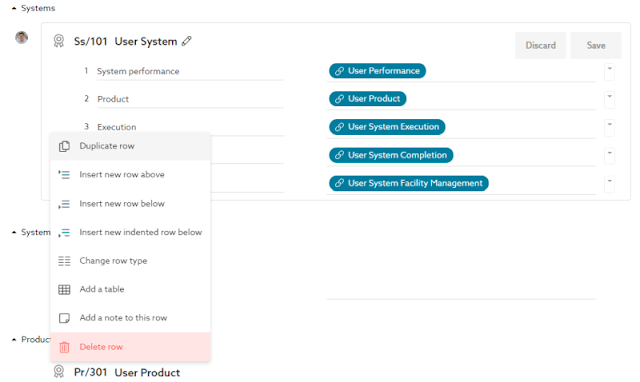
To add a new user clause, this can be done from the 'three dot' menu to the left in the editor. Then the new clause can be given a number, a title and spec content can be added.

Note that for some content sets the number will be automatically applied. For the UK CAWS content (or UK Uniclass 2015 PM content) a number must be added to determine the position in the section.

Insert new clause

Add a clause number, title and add your specification content

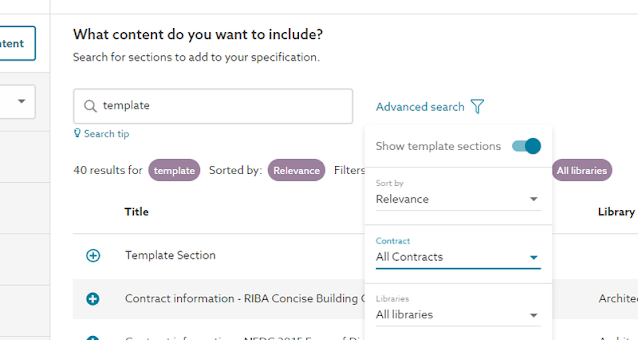
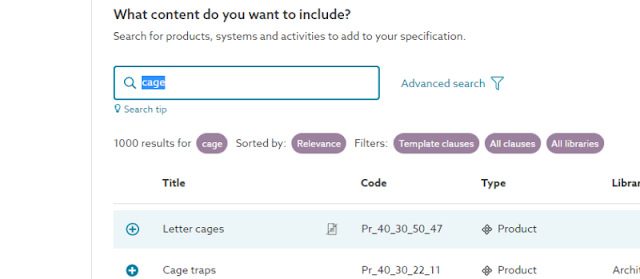
To add an entirely new section, this can be done by searching for 'template' in the 

Search for 'template' content
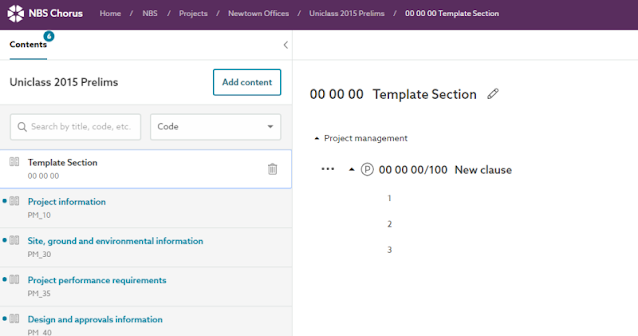
A new template section will be added to the specification/prelims

Add the content that you would like to add

2. System-based content 

The 'system-based' content is more complex as each clause can have multiple parents or multiple children and these clauses are linked together.

So a partition system clause and a ceiling system clause may both have links to a child plasterboard clause.

Adding user clauses is not something that we currently have a smooth process for and this functionality is not yet planned in on our roadmap. There are two workarounds however that are highlighted below: 

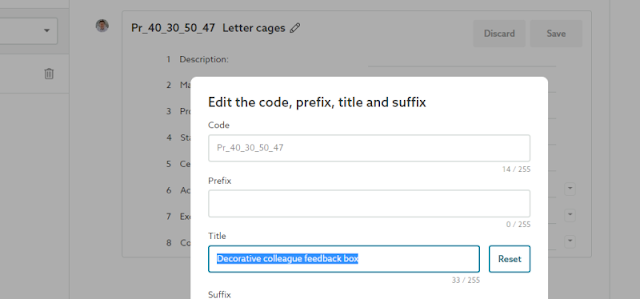
The main workaround is currently to find an NBS template clause and amend to suit.

Find a clause that is similar

Amend the title to suit

The second workaround is more complex - but more powerful.

A question I have been asked four of five times by different practices this year is:

How can I add a user clause in front of multiple systems as an introduction to the 'work package'?

The trick here (for now) is to import user clauses from an NBS Create desktop specification file - and then amend when in Chorus.

A downloadable NBS Create specification with template user clauses can be downloaded from the link below:
https://drive.google.com/drive/folders/1dklrgxz1AY4wcJXX_N_HPDN0TTtut_NG?usp=sharing

Step 1 - Upload the NBS Create specification to Chorus to create a template spec/master...

User clauses from Create within Chorus as a template/master

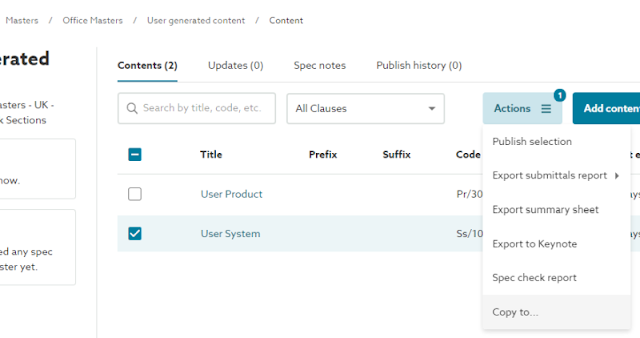
Step 2 - For every user clause needed - copy and paste from this template/master into the project

Copy to a project spec

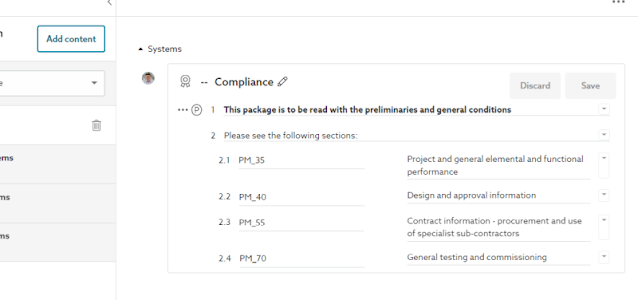
 Step 3 - Remove all unnecessary content and edit to add the required content

Edit the clause

The finished clause

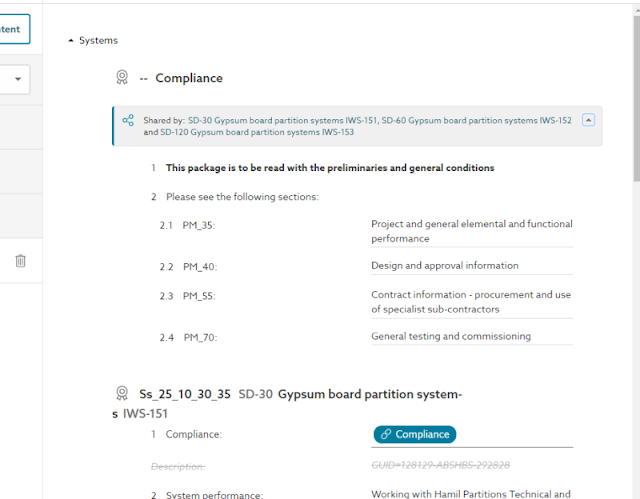
Step 4 - Reference this clause from any relevant system

Reference the user clause

If the user clause is a 'system clause' it will appear alphanumerically within the parent system

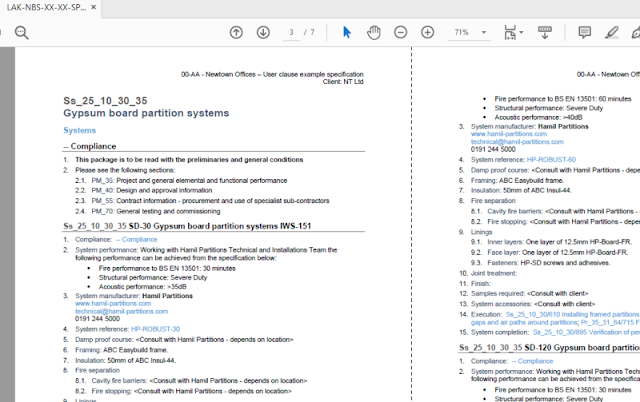
Step 5 - Choose the 'grouped systems by code' option on the publishing

The end result: A user clause introduction to a package of systems


Friday, 2 July 2021

Export to Keynote for NBS Chorus

Another feature was released in NBS Chorus this week, the ability to export a Keynote file from the specification.

The NBS recommended method of coordinating model and specification information is through our plug-ins for Revit, Archicad and Vectorworks. This allows to design and write specifications in the same workspace, to read the guidance and to 'clash check' the annotations.

However, through our forums, we recognise that not all customers are using versions of design tools that support plug-ins and they would like to simply export the information from the specification into a 'Keynote' style file so they can annotate items in their drawings.

The screenshots below show how this is now possible. Please click the screenshots below to see the images in more detail.

A project specification with different types of window (WNS-001, WNS-002...) 

Export the clause details to a Keynote text file

Annotate the drawings with the correct specification reference

To find out more about NBS Chorus see:

https://www.thenbs.com/nbs-chorus

Thursday, 11 February 2021

An introduction to NBS

Maybe you are an architect or an engineer wanting a digital specification solution?

Maybe you are a client wanting to receive record specifications and audit trails in a structured data format?

Maybe you are a construction manufacturer wanting to be specified more?

If so, then watch the video below to get a 60 seconds introduction to NBS...


If, you then want to know more, then the on-demand webinar below is a slightly deeper dive 30 minutes(ish) presentation on NBS from myself...

https://www.thenbs.com/an-introduction-to-the-nbs-platforms

Friday, 18 December 2020

NBS - A look back at 2020

As we're approaching the end of the year, I thought I'd look back on 2020 and blog about what we've been up to at NBS.

Let's look at things in three sections 1. NBS Chorus, 2. NBS Source and 3. Other activity.

1. NBS Chorus

We expected NBS Chorus usage to grow steadily this year, but nobody could have predicted by how much. With the majority of our users being forced to work from home, the industry moved away from installed software to cloud software. As a result, we end the year with the majority of those previously using NBS Building and NBS Create now using NBS Chorus for their specification writing.

We recognised that this was the future and we are now retiring our desktop products and focusing all attention on our cloud platforms. Some of the biggest features are looked at below...

1.1 Revisions and publication history

All of the specifications published now are stored in the cloud. Each publication has defined meta data that aligns to the ISO 19650 framework (suitability, revisions, container ID...). Within each specification all items can be classified to Uniclass 2015 and new, amended and deleted requirements are clearly highlighted.

A record of all specifications issued on a project

Further information - https://support.thenbs.com/support/solutions/folders/7000042806

1.2 Import from NBS Building

Last year we implemented the ability to import an NBS Create specification for use in NBS Chorus with the Uniclass 2015 classification. In 2020 we implemented the same process to allow NBS Building specifications to be imported retaining their CAWS classifications.

Traditional NBS specifications - a more modern version of Building in the cloud

Further information - https://support.thenbs.com/support/solutions/folders/7000043439

1.3 Company stylesheets

Content is king. But how the content looks is also pretty important, We've learnt over the years that designers want their documentation, drawings and specification to have the same presentation. By introducing templates into Chorus, users can present their specifications to look as they wish.

Customer title and cover pages and logos, styles and header-footers

Further information - https://support.thenbs.com/support/solutions/folders/7000043430

1.4 NBS Chorus Small Works

We recognise that for jobs of a more simple nature that all of the NBS specification and guidance content is not needed. We introduced a lower price Chorus offering for the smaller practices. Small Works comes with one simple content set, but is still offered in the Chorus 1 or Chorus 2 feature package as we recognise that smaller practices still utilise the best technology.

Chorus small works

Further information - https://www.thenbs.com/nbs-chorus/small-works 

1.5 NBS plug-in

In 2019 we worked with partners Autodesk and Archicad to launch NBS Chorus plug-ins. As many of the smaller practices use Vectorworks, it was great to be able to adapt the plug-in to work seamlessly with that design tool too in 2020.

Great seeing NBS Chorus embedded in the leading design tools

Further information - https://support.thenbs.com/support/solutions/folders/7000043018

2. NBS Source

We'd realised that the way we presented our manufacturer product information needed a refresh. Having case studies and literature in RIBA Product Selector, specifications in NBS Plus and digital objects in NBS National BIM Library was a disjointed approach. With NBS Source we brought simplicity and a new offering within a single modern web platform.

Having our product teams focus on only two platforms allowed us to deliver lots of value throughout the year. This will continue throughout 2021. Some of the biggest features from 2020 are below...

2.1 Searching

As the user types, suggestions appear with respect to categories (Uniclass 2015), manufacturers and construction products. Once clicked, the search results are filterable to enable the user to find the information they need quickly and easily. 
All the great search features that users are used to from sites like Amazon, Ebay, Autotrader etc...


2.2 Rich product pages

Through our user focus groups we learnt that specifiers value imagery, third party certification, guidance on application/suitability, standardized specification information and digital objects. Each product page presents this information consistently for each manufacturer. The allows designers, contractors, sub-contracts and facility managers to access the information they need from a single source. 
The technical information specifiers need


2.3 Alignment with the specification

NBS Source is a mirror of NBS Chorus. Specifications are quite often developed generically and then a manufacturer's product that meets this specification is selected. By aligning both platforms and sets of data we make the specification process easier and more transparent for all involved.
Manufacturer technical details aligned to the NBS generic specification structure


2.4 Linked information

The information on Source is interlinked. A user can read a catalogue, jump to view technical information about the products within it, then read a case study about a particular product, download the digital object and finally add the product to the specification.
Relevant information linked together - products, case studies, catalogues, certificates...


2.5 A self-serve platform

...and we have greatly simplified the process that manufacturers follow to enter their data into the system. Technical information is added and aligned to the NBS specification structure, the NBS technical team then moderate this adding any comment. Then this is signed off and the content is pushed live to industry.  
A self-serve platform and QA process to manage the data in the NBS Source system
The content from almost 1,500 manufacturers is incrementally being enhanced on Source each week. The Source content is also presented within the Chorus specification platform.
Visit Source to try it now - https://source.thenbs.com/

3. Other activity

3.1 Construction Leaders' Summit

Our annual conference in October has an amazing set of speakers over the two days. Each presentation was 15-20 minutes long and we recorded each one and made it available on our mini website:

Whether it is Phil Bernstein, or Paul Morrell or Dame Judith Hackitt you'd like to hear from - check out the presentations on our website.
The UK Construction Minister speaking at the main NBS event, and one or two others...

3.2 RIBA Plan of Work 2020 webinar series

Early in the year we partnered with the RIBA and many leading practices (Aecom, HOK, Scott Brownrigg...) to host free webinars on the RIBA Plan of Work and the key topics that it covers.

These webinars are all still available to view on demand for free on the topics: Introduction - Fire safety - Sustainability - Inclusive Design - Conservation - Information Exchanges - Health and safety
The key topics on every project

3.3 NBS customer stories

Every month in 2020 we've published an article with images and videos on how leading companies are benefitting from their use of Chorus or Source. Check out six of the best below:
Designers and manufacturers working collaboratively in the cloud

3.4 Uniclass 2015

Uniclass continues to grow with classifications added from all sectors of the built environment. Uniclass 2015 is now the primary classification system that under-pins Chorus and Source. It is embedded in the UK BIM Framework and UK Government Departments are working with NBS daily to ensure it covers the scope of items needed to model the built environment.
Uniclass continuing to grow

3.5 Exciting times ahead in 2021

Check out the press release about NBS joining the Byggfakta Group of companies:

To be part of a collection of solutions in the field of project information, specification, product information and procurement that are best-in-class across Europe will be the start of an awesome journey. ...and with Glenigan joining the group this month too there are exciting times ahead.  

Merry Christmas and Happy New Year

Friday, 11 December 2020

Classification mapping - Uniclass 2015 to CAWS

This blog posts builds on an article I wrote for theNBS.com - Specifications and classifications

https://www.thenbs.com/knowledge/specifications-and-classification

There are a number of use cases for classify assets/things, for example:

  • An annotation on a drawing or schedule;
  • A clause reference in a specification;
  • A Category code in a COBie spreadsheet; or even
  • A label on a physical product
In the UK, the two most common classification systems are Uniclass 1997 (in particular Table L aka Common Arrangement of Work Sections aka CAWS) and Uniclass 2015. 

The need to develop Uniclass 2015 to meet the demands of a digitalized construction industry is detailed at the web page below:

But with roughly half of the industry choosing CAWS and half choosing Uniclass 2015, the question often arises, do they map? and if so how?

In our latest release of NBS Source, all manufacturer systems and products with specifications information now have both Uniclass 2015 codes and CAWS codes. 

Some examples below showing the mapping. Starting with a simple examples and then gradually showing more complex examples.

1. Simple example

One of the aims behind the Uniclass 2015 project was to have a single classification to represent each 'thing' in the built environment. So one classification for a Secondary School (Co_25_10_77) down to one classification for an Interactive Whiteboard (Pr_40_30_25_42).

So in CAWS, is it the same and there is a nice one to one mapping?

Not quite, but almost so in the most simple examples. Consider a daylight pipe.

Source example - https://nbs.fyi/M8wKaK

Simple example - Daylight Pipe

There is a one-to-one mapping between Pr_30_59_72_21 Daylight pipes and L10/495 Daylight pipe.

Moving up a level in the tree L10 groups Windows/ rooflights/ screens/ louvres and Pr_30_59_72 groups Rooflights with Pr_30_59 grouping all Openings and opening component products.

By clicking on the classification reference in Source then similar products may be viewed.
- Rooflights filtered to show only daylight pipes

Grouping different types of rooflights together

But this is a one-to-two mapping! What is L10/52 Daylight pipes?

This is the simplified clause in L10 used in the Small Works library. For legacy reasons, there are many products with multiple CAWS references with a specification clause for more complex work and one for more simple work. 

2. Not quite as simple example

The second example is a concrete roof tile.

Source example: https://nbs.fyi/awY4MC

Not quite as simple - a concrete roof tile

In this example, Uniclass 2015 is simple - one code for one physical product. But CAWS unfortunately has a clause for concrete roof tiling and another one for concrete roof tiling with counterbattens. Then, in addition, there are small works versions of both of these.

So analysing 'big data' across many projects with CAWS would need a look up of for four codes.

With Uniclass 2015, a client need look up just one.

Again, the parent groupings allow similar products to be quickly viewed.

View concrete interlocking tiles within the parent category of roof and cladding units

3. Complex example

The most complex example can be seen with products that can be used with many systems. The way CAWS references evolved over time means that there can be a huge number of relevant reference codes. However, with Uniclass 2015 there is only a single code in the majority of cases.

In this final example we will look at lime mortar

Source example: https://nbs.fyi/IW6SQo

Complex example - one to many

When the CAWS content was developed, computers were barely used and we lived in a paper world. Now we have modelling tools that can create a link between a parent system and a child product (such as NBS Chorus) or a parent space and a child system (such as Archicad/Revit). So each thing can have a single code and the modelling tool can digitally give the context.

The screenshots below shows one type of lime mortar being used by two different systems. But specified once. By specifying once it makes procurement easier and when potentially defending specification decisions gives context. For clients that want build a digital estate - it makes data querying achievable.

Masonry system A linking to the mortar product 


Masonry system B linking to the same mortar product


The product specified once - but with clear context shown 

To view the mappings, explore NBS Source (free-to-industry):
https://source.thenbs.com/

To specify to the Uniclass 2015 structure, CAWS structure use NBS Chorus (subscription):
https://www.thenbs.com/nbs-chorus

To watch a video to learn more about NBS offerings - click below:

- NBS in 60 seconds

- NBS in 30 minutes

Thursday, 19 November 2020

NBS Plug-in for Revit - the parameters that are used

I've had two or three sessions with customers in recent weeks who want a deeper dive into exactly what parameters the NBS Plug-in uses to connect objects to specification clauses. This blog post summarises this. There is also a support article on our Chorus forums about this:
https://support.thenbs.com/support/solutions/articles/7000043835-parameters-inserted-into-objects-after-association

The screenshot below shows three instances of the same type of washbasin in Revit. The schedule shows the NBS parameters that are inserted into an object when linked to NBS Chorus. These will be inserted into any object - the object could be from National BIM Library or an object a practice has created or an 'out of the box' Revit object - it doesn't matter.

Click the screenshots below to see larger views.

A schedule showing the parameters that will be used
The screenshot below shows how an association can be made between the Revit object and the NBS Chorus clause...
Associate an object with the specification clause

Once the association is made, the parameter values are populated. It should be noted that the expectation is that the NBSChorusProjectId, NBSChorusSpecificationId and NBSChorusClauseId parameters are ignored and are just hidden in the background. But in this blogpost I've highlighted them to show the mechanics of how the associations are made and retained. The NBSChorusPrefix, Uniclass2015Code, Uniclass2015Title and NBSChorusSuffix parameters are expected to be used in schedules and annotations.
The parameters are populated

Again, not something that most users will want to know - but the URL of the specification location matches the GUIDs used in the Id parameters. These are highlighted in colour below and in the screenshot.

In this specific case:

URL=https://chorus.thenbs.com/org/ef335f70-956f-11e8-9420-5985807a4792/project/4eed4d80-cdb9-11ea-af47-1dfdb8ac8056/spec/f30feab0-259a-11eb-abbe-11959d020b9b/viewer/clause/8eef6922-13b8-4c10-9e9f-81537f981558

NBSChorusProjectId=4eed4d80-cdb9-11ea-af47-1dfdb8ac8056

NBSChorusSpecificationId=f30feab0-259a-11eb-abbe-11959d020b9b

NBSChorusClauseId=8eef6922-13b8-4c10-9e9f-81537f981558

The GUIDs can also be seen in the web URL
By maintaining these GUIDs it is possible to maintain the association even if the visible parameters used in scheduling/annotating change as shown below.
The visible parameters may be changed
When the visible parameters become out of sync - the plug-in allows the user to synchronise these once again.
The GUIDs retain the associations and flag any changed visible parameters
By keeping the information coordinated, the drawings and schedules exported from the model can be kept synchronised with information in the live specification.
The plug-in assists with re-synchronising the visible parameters

A few notes to finish on.

Note 1: The rules above apply to Revit system and component objects. For material objects a '_mtrl' suffix is added to the parameter names

Note 2: The above example is for Uniclass 2015 classifications. Similar parameters with slightly different names (for example CAWSCode...) are used for other classification sets such as CAWS or Omniclass.

Thursday, 22 October 2020

Specification - Ten things you should be doing on every project

I delivered the final presentation at our recent Construction Leaders' Summit last week. The brief was to give some really practical examples of how NBS Chorus can help reduce risk and improve efficiencies when delivering construction projects.

I always like lists, so I thought going through a checklist of ten specification considerations through a typical project timeline may be an interesting approach. 

Each of the ten items has a short 60 second video with an explanation, and the presentation can be watched below.

After a presentation to several hundred people, it's always nice to see positive feedback. Especially nice to get this comment below on linkedin from Gio Vettori from Woods Bagot. Kind comments appreciated Gio!

All of the presentations from the summit can be watched on-demand at the link below:

https://www.thenbs.com/events/cls2020

To see examples of NBS users putting these principles into practice see our case studies page:

https://www.thenbs.com/knowledge/case-studies

Monday, 12 October 2020

NBS Chorus and publication styling (2 of 2)

 I previously blogged about the new stylesheet functionality in NBS Chorus:
https://constructioncode.blogspot.com/2020/10/nbs-chorus-and-publication-styling.html

As part of some fun testing we had a competition to see who could create the best output using the new feature. We asked Twitter to decide the winner.

In February 2002, 8.7million people voted to decide the X Factor winner between Will Young and Gareth Gates. The excitement and anticipation was no less in October 2020, we received 14 votes to decide the two finalists for the NBS print stylesheet championship.

A sad day for 'Double trouble' which was the Hamil effort :(

So the two finalists are 'Grey sky at night' and 'Front page pics'. Twitter will decide who wins the £20 Amazon voucher.

- Vote now

Grey sky at night
Word background imagery on cover page and great use of meta data throughout
Front page pics
Similar use of meta data - some of the crack team of testers on the lovely front page

- Vote now

Update - winner was Grey Sky at Night - well done BB!


One special mention for a final entry which just didn't make the finish deadline. This came in from our Platform Delivery Director early Saturday morning. Disqualified for (a) not being on brand and (b) missing the deadline. But worth posting due to the awesome use of of meta data on the spec pages.

Awesome front cover

Just showing off now by toggling the section meta data vertically on each page :)

Learn more about how the feature works in the previous post:
https://constructioncode.blogspot.com/2020/10/nbs-chorus-and-publication-styling.html